Set up FCM (push.freqdroid.com)
FreqTrade posts to a single endpoint at push.freqdroid.com. The relay encrypts each payload with your device's public key (NaCl sealed box, X25519 + XSalsa20-Poly1305) and forwards it to Google FCM. Your device decrypts and displays the notification — Google sees only ciphertext, and the relay never logs payloads.
← Back to overview · Add the Python callback →
FreqTrade → POST → push.freqdroid.com → sealed box → FCM → device
Android only at the moment. iOS support arrives with the App Store release.
Step 1 — Register in the app
- Open the app → hamburger menu → Settings → Notification Server.
- At the top, switch the transport to FCM.
- Tap Register & Save. The app generates a keypair (kept locally), uploads your FCM token + public key to the relay, and the status changes to Registered.
- Tap Copy URL to put the webhook URL on your clipboard.
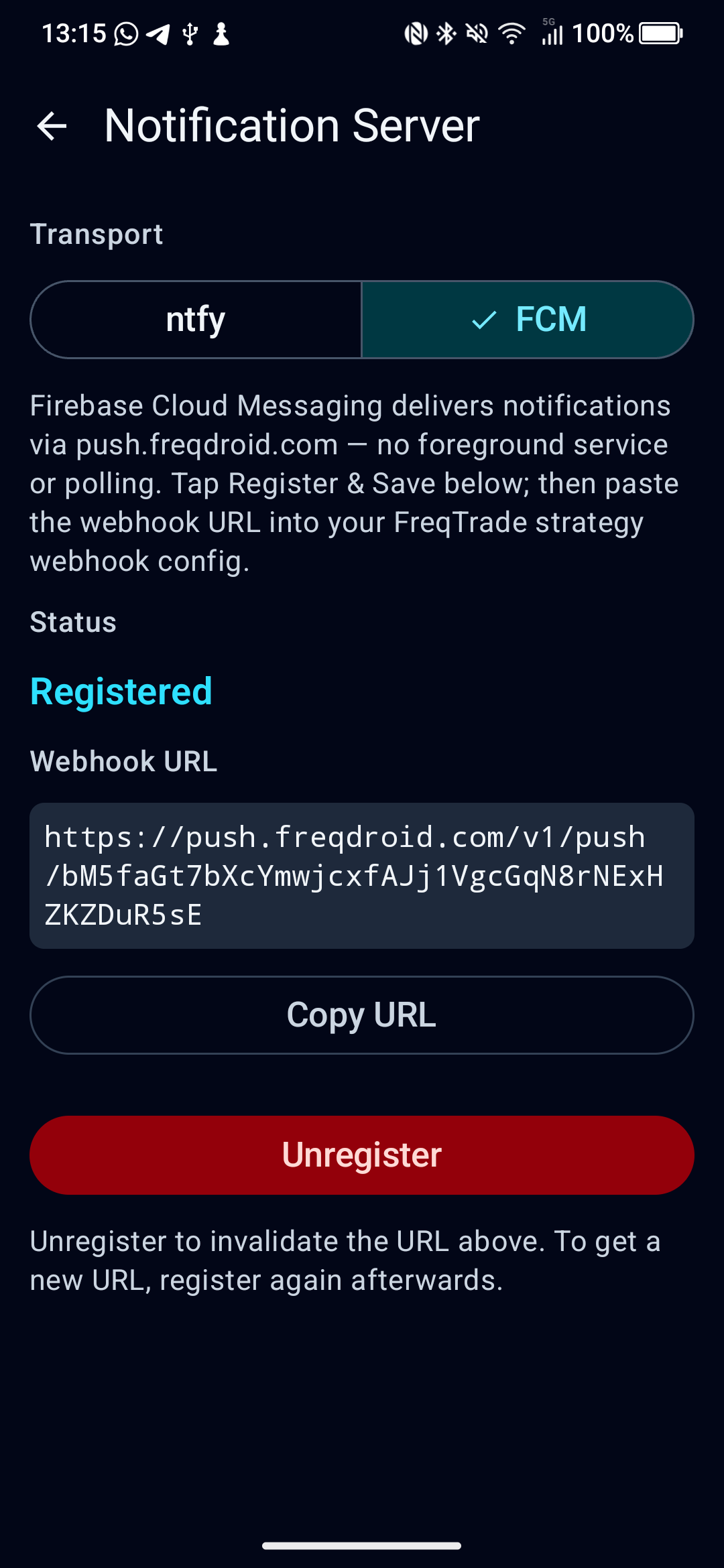
The URL is of the form:
https://push.freqdroid.com/v1/push/<deviceToken>
Treat the URL as a shared secret — anyone who knows it can post notifications to your device (they cannot read any of your trade data, only flood your notifications). Tap Unregister any time to invalidate it; tap Register & Save afterwards to get a fresh URL.
Step 2 — Configure FreqTrade webhooks
Use format: json and include bot_name so the in-app notification list can group by bot. See the full event list and template tokens on the overview page.
"webhook": {
    "enabled": true,
    "url": "https://push.freqdroid.com/v1/push/PASTE_YOUR_DEVICE_TOKEN_HERE",
    "format": "json",
    "retries": 3,
    "retry_delay": 0.2,
    "allow_custom_messages": true,
    "entry": {
        "bot_name": "MyBot",
        "message": "Entry placed (#{trade_id})\n{direction} {pair} @ {open_rate:.6f} | stake {stake_amount:.2f} {stake_currency}"
    },
    "entry_fill": {
        "bot_name": "MyBot",
        "message": "Trade opened (#{trade_id})\n{pair} @ {open_rate:.6f} | stake {stake_amount:.2f} {stake_currency}"
    },
    "entry_cancel": {
        "bot_name": "MyBot",
        "message": "Entry cancelled (#{trade_id})\n{pair} entry order cancelled"
    },
    "exit": {
        "bot_name": "MyBot",
        "message": "Exit placed (#{trade_id})\n{pair} @ {limit:.6f}"
    },
    "exit_fill": {
        "bot_name": "MyBot",
        "message": "Trade closed (#{trade_id})\n{pair} | profit {profit_amount:.2f} {stake_currency} ({profit_ratio:.2%})"
    },
    "exit_cancel": {
        "bot_name": "MyBot",
        "message": "Exit cancelled (#{trade_id})\n{pair} exit order cancelled"
    },
    "protection_trigger": {
        "bot_name": "MyBot",
        "message": "Pair locked: {pair}\n{reason}\nLocked until {lock_end_time}"
    },
    "protection_trigger_global": {
        "bot_name": "MyBot",
        "message": "Protection triggered: {reason}\nAll pairs locked until {lock_end_time}"
    },
    "strategy_msg": {
        "bot_name": "MyBot",
        "message": "{msg}"
    },
    "status": {
        "bot_name": "MyBot",
        "message": "Status: {status}"
    },
    "startup": {
        "bot_name": "MyBot",
        "message": "{status}"
    },
    "warning": {
        "bot_name": "MyBot",
        "message": "Warning: {status}"
    },
    "exception": {
        "bot_name": "MyBot",
        "message": "Exception: {status}"
    }
}
If you wire up the Python callback, drop
entry_fillandexit_fillfrom this block — the callback emits richer messages viadp.send_msg(), and keeping the built-in fills would give you double notifications.
Field semantics — FreqDroid’s parser reads:
- Title ←
title→bot_name→type→"FreqDroid"- Body ←
message→status→ raw JSON- Bot routing (for tap-to-navigate) ←
bot_name→nameThe examples above use
bot_name+messagebecause they’re the primary fields the parser looks for.statusis also accepted as a body fallback if you prefer to keep parity with FreqTrade’s native field names.
Trade ID for tap-to-navigate — include
(#{trade_id})somewhere in the body so FreqDroid can route taps to the right trade.
Restart FreqTrade after editing config.json. Verify the path with curl using your copied URL:
curl -X POST "https://push.freqdroid.com/v1/push/<deviceToken>" \
  -H "Content-Type: application/json" \
  -d '{"bot_name":"Test","message":"Test entry (#1) BTC/USDT"}'
A notification should appear on the device within ~2 seconds. The relay returns {"status":"ok"} once it has handed the message to FCM.
Switching back to ntfy
Tap Unregister in the FCM section, then switch the transport segment to ntfy. The FCM URL becomes invalid the moment you unregister; FreqTrade webhooks pointed at it will get {"detail":"unknown device token"}. Update them to your ntfy URL — see the ntfy setup for the matching webhook block.
Troubleshooting
curl returns {"status":"ok"} but no notification appears
The relay successfully forwarded to FCM. Most common cause on Android: an OEM battery manager blocked the background service. Try the curl test with the screen ON first; if it works that way, add FreqDroid to your phone’s battery whitelist or “auto-launch” list (Settings → Apps → FreqDroid → Battery → Unrestricted).
{"detail":"unknown device token"}
The URL is stale (you re-registered, generating a new token). Open the app, copy the current URL from Settings → Notification Server.
Status reads “Failed”
Usually a network issue contacting push.freqdroid.com. Tap the button again to retry.
Tapping a notification doesn’t open the trade
The notification text must contain #<trade_id> (e.g. (#123)). Make sure your webhook templates include #{trade_id} — see the example above.